fiatlight.fiat_togui is the central module that is able to associate a GUI with a type.
It uses sophisticated mechanisms to inspect the type of function parameters and return values.
It handles a registry of types and their associated GUIs, to which you can add your own types, by calling fiatlight.register_type(DataType, DataTypeWithGui), where DataType is the type you want to register, and DataTypeWithGui is the class that will handle the GUI for this type.
DataTypeWithGui must inherit from AnyDataWithGui and implement the necessary callbacks.
Explore the registry
The fiatlight command line utility is a powerful tool that allows you to explore the available widgets and types in Fiatlight. It can be used to list the available types, to print the GUI info for a given type, and to run a GUI demo for a given type.
Here is the help message for the fiatlight command line utility:
%%bash
fiatlight --help
INFO: Showing help with the command 'fiatlight -- --help'.
NAME
fiatlight
SYNOPSIS
fiatlight COMMAND
COMMANDS
COMMAND is one of the following:
types
List registered types, with a possible query to filter them. Add an optional query to filter the types.
gui
Print the info and fiat attributes available for a given type. Add the datatype or Gui type name as an argument (if not provided, all Gui widgets names are printed)
fn_attrs
Display the available fiat attributes for a function
See the page Tutorials/fiatlight command line utility for more information.
Primitive types
The primitive types int, float, str, bool are registered by default.
Basic example
import fiatlight as fl
def foo(a: float, b: float = 3.0, times_two: bool = False) -> float:
    return (a + b) * (2 if times_two else 1)

# Run an app that displays the GUI for the function
# where the user can input the values of the parameters
# (or use the default values)
fl.run(foo, app_name="Primitive Basic")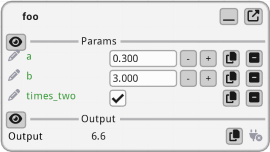
Example with custom GUI options
The GUI for these primitive types is extensively configurable via fiat attributes. Below, we customize the GUI for the celsius parameter to be a slider ranging from 0 to 100, with a specific format for displaying the value.
See FunctionWithGui for a comprehensive list of all the available attributes (in the “Customizing parameters GUI” section).
import fiatlight as fl


@fl.with_fiat_attributes(celsius__range=(0, 100), celsius__format="%.1f °C")
def to_fahrenheit(celsius: float) -> float:
    return celsius * 9 / 5 + 32


fl.run(to_fahrenheit, app_name="Primitive Custom")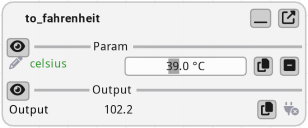
Range limited numeric types
As a convenience, Fiatlight includes those predefined types for which the GUI will take into account their boundings.
from typing import NewType

# Float types with specific ranges (bounds included)
Float_0_1 = NewType("Float_0_1", float)  # 0 to 1
Float_0_1.__doc__ = "synonym for float in [0, 1] (NewType)"

Float__1_1 = NewType("Float__1_1", float)  # -1 to 1
Float__1_1.__doc__ = "synonym for float in [-1, 1] (NewType)"

PositiveFloat = NewType("PositiveFloat", float)  # Any positive float ( strictly greater than 0)
PositiveFloat.__doc__ = "synonym for float > 0 (strictly greater than 0) (NewType)"

# Int types with specific ranges (bounds included)
Int_0_255 = NewType("Int_0_255", int)  # 0 to 255
Int_0_255.__doc__ = "synonym for int in [0, 255] (NewType)"
File name types
Several file types names are registered by default. They are synonyms for str and are used to specify file paths.
They will be presented with a file dialog in the GUI.
from fiatlight.fiat_notebook import look_at_code
%look_at_python_code fiatlight.fiat_types.file_typesColor types
Several color types are registered by default.
%look_at_python_code fiatlight.fiat_types.color_typesExample: using color types in function
import fiatlight as fl
from fiatlight.fiat_types import ColorRgb, ColorRgba

def color_chooser(color1: ColorRgba, color2: ColorRgb) -> str:
    return f"You selected: {color1=}, {color2=}"

fl.run(color_chooser, app_name="Color Chooser")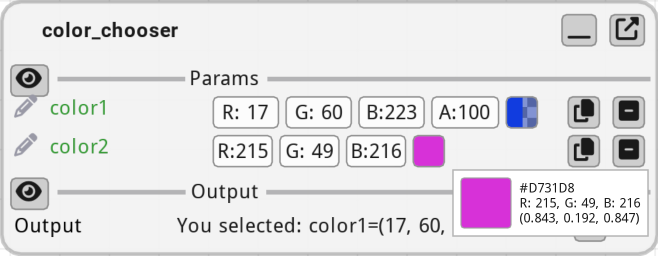
Optional types
If a type is registered, its optional version is also registered.
Example: using an optional color in a function
(In this example, the user needs to click on “Set” to set a value to the optional color)
import fiatlight as fl
from fiatlight.fiat_types import ColorRgb, ColorRgba

def color_chooser(color: ColorRgb | None = None) -> str:
    return f"You selected: {color=}"

fl.run(color_chooser, app_name="Optional Color")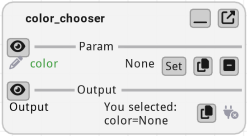
Lists
A very basic support is provided for lists. It does not allow to edit the values. However, it can present a list of values using (all of them will be rendered as string using str() function).
import fiatlight as fl
from fiatlight.fiat_types import TextPath

def list_words_in_file(filenames: TextPath) -> list[str]:
    with open(filenames) as f:
        return f.read().split()

fl.run(list_words_in_file, app_name="List Words in File")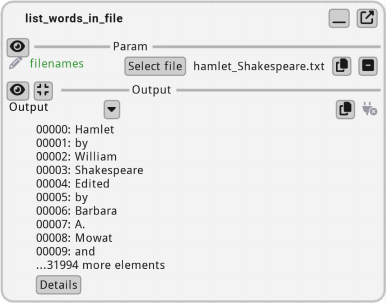
Enum classes
Enum classes are automatically associated to a GUI.
import fiatlight as fl
from enum import Enum

class Color(Enum):
    Red = 1
    Green = 2
    Blue = 3

def color_chooser(color: Color) -> str:
    return f"You selected: {color.name}"

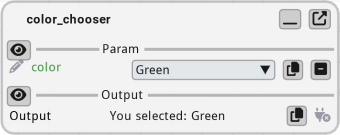
fl.run(color_chooser, app_name="Enum Color")