Fiatlight provides an advanced image viewer and analyzer which enables to zoom, pan, look at pixel values and sync the zoom across images.
Example
from fiatlight.fiat_kits.fiat_image import fiat_image_attrs_demo
fiat_image_attrs_demo.main()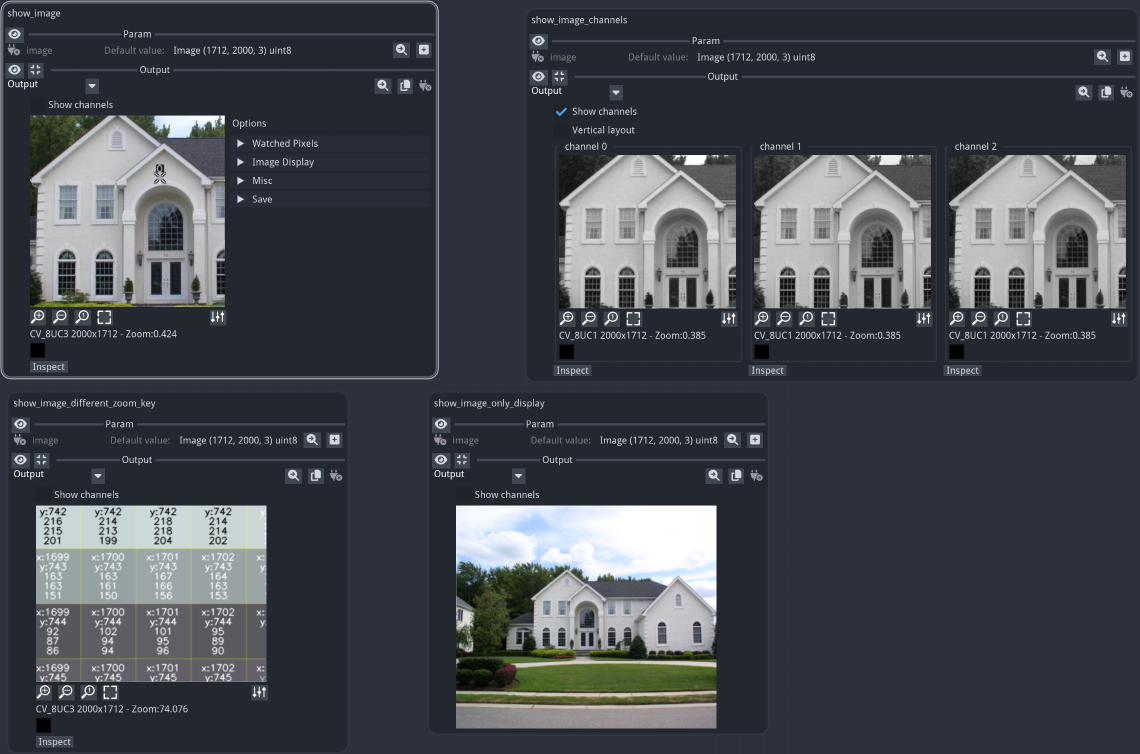
In the “show_image” output, the options panel was opened
The “show_image_channels” output shows the image channels, and it zoom/pan is linked to “show_image”
The “show_image_different_zoom_key” image has a different zoom key, and the zoom/pan is not linked to “show_image”. It also zoomed at a high-level, so that pixel values are displayed.
the “show_image_only_display” image is displayed, and cannot be zoomed or panned (the widget may be resized however)
Fiat attributes available for the ImageWithGui widget
The image widget provided with fiat_image is extremely customizable. Here is a list of all the possible customizations options:
%%bash
fiatlight gui ImageWithGui
GUI type: ImageWithGui
=======================
A highly sophisticated GUI for displaying and analysing images. Zoom/Pan, show channels, show pixel values, sync zoom accross images, etc.
Available custom attributes for fiat_image.ImageWithGui:
--------------------------------------------------------------------------------
+---------------------------------+-----------------+-----------+-----------------------------------------------+
| Name | Type | Default | Explanation |
+=================================+=================+===========+===============================================+
| | | | **Main attributes for the image viewer** |
+---------------------------------+-----------------+-----------+-----------------------------------------------+
| only_display | bool | False | Only display the image, no info displayed, no |
| | | | zoom, no pan |
+---------------------------------+-----------------+-----------+-----------------------------------------------+
| image_display_size | tuple[int, int] | (200, 0) | Initial size of the displayed image (width, |
| | | | height). One of them can be 0 |
+---------------------------------+-----------------+-----------+-----------------------------------------------+
| zoom_key | str | z | Key to zoom in the image. All images with the |
| | | | same zoom key will be zoomed together |
+---------------------------------+-----------------+-----------+-----------------------------------------------+
| is_color_order_bgr | bool | True | Color order is BGR (default is True). OpenCV |
| | | | uses BGR by default, unfortunately. |
+---------------------------------+-----------------+-----------+-----------------------------------------------+
| can_resize | bool | True | Can resize the image by dragging the mouse at |
| | | | the bottom right corner |
+---------------------------------+-----------------+-----------+-----------------------------------------------+
| | | | **Channels** |
+---------------------------------+-----------------+-----------+-----------------------------------------------+
| show_channels | bool | False | Show channels |
+---------------------------------+-----------------+-----------+-----------------------------------------------+
| channel_layout_vertically | bool | False | Layout channels vertically |
+---------------------------------+-----------------+-----------+-----------------------------------------------+
| | | | **Zoom & Pan** |
+---------------------------------+-----------------+-----------+-----------------------------------------------+
| pan_with_mouse | bool | True | Pan with mouse |
+---------------------------------+-----------------+-----------+-----------------------------------------------+
| zoom_with_mouse_wheel | bool | True | Zoom with mouse wheel |
+---------------------------------+-----------------+-----------+-----------------------------------------------+
| | | | **Info displayed on image** |
+---------------------------------+-----------------+-----------+-----------------------------------------------+
| show_school_paper_background | bool | True | Show school paper background, when the image |
| | | | is unzoomed |
+---------------------------------+-----------------+-----------+-----------------------------------------------+
| show_alpha_channel_checkerboard | bool | True | Show alpha channel checkerboard |
+---------------------------------+-----------------+-----------+-----------------------------------------------+
| show_grid | bool | True | Show grid with the zoom level is high |
+---------------------------------+-----------------+-----------+-----------------------------------------------+
| draw_values_on_zoomed_pixels | bool | True | Draw values on pixels, when the zoom is high |
+---------------------------------+-----------------+-----------+-----------------------------------------------+
| | | | **Info displayed under the image** |
+---------------------------------+-----------------+-----------+-----------------------------------------------+
| show_image_info | bool | True | Show image info, i.e image size and type |
+---------------------------------+-----------------+-----------+-----------------------------------------------+
| show_pixel_info | bool | True | Show pixel info, i.e. show pixel value and |
| | | | position under the mouse |
+---------------------------------+-----------------+-----------+-----------------------------------------------+
| | | | **Control buttons under the image** |
+---------------------------------+-----------------+-----------+-----------------------------------------------+
| show_zoom_buttons | bool | True | Show zoom buttons |
+---------------------------------+-----------------+-----------+-----------------------------------------------+
| show_options_panel | bool | True | Show options panel |
+---------------------------------+-----------------+-----------+-----------------------------------------------+
| show_options_button | bool | True | Show options button |
+---------------------------------+-----------------+-----------+-----------------------------------------------+
| show_inspect_button | bool | True | Show the inspect button, that enables to open |
| | | | a large version of image in the Image |
| | | | Inspector |
+---------------------------------+-----------------+-----------+-----------------------------------------------+
Available custom attributes for AnyDataWithGui Generic attributes:
--------------------------------------------------------------------------------
+----------------+--------+---------------------+------------------------------------------------+
| Name | Type | Default | Explanation |
+================+========+=====================+================================================+
| | | | **Generic attributes** |
+----------------+--------+---------------------+------------------------------------------------+
| validate_value | object | None | Function to validate a parameter value (should |
| | | | return DataValidationResult.ok() .error() |
+----------------+--------+---------------------+------------------------------------------------+
| label | str | | A label for the parameter. If empty, the |
| | | | function parameter name is used |
+----------------+--------+---------------------+------------------------------------------------+
| tooltip | str | | An optional tooltip to be displayed |
+----------------+--------+---------------------+------------------------------------------------+
| label_color | ImVec4 | ImVec4(0.000000, | The color of the label (will use the default |
| | | 0.000000, 0.000000, | text color if not provided) |
| | | 1.000000) | |
+----------------+--------+---------------------+------------------------------------------------+
Code to test this GUI type:
----------------------------
```python
import typing
import fiatlight
@fiatlight.with_fiat_attributes(
# Main attributes for the image viewer
union_param__only_display = False,
union_param__image_display_size = (200, 0),
union_param__zoom_key = "z",
union_param__is_color_order_bgr = True,
union_param__can_resize = True,
# Channels
union_param__show_channels = False,
union_param__channel_layout_vertically = False,
# Zoom & Pan
union_param__pan_with_mouse = True,
union_param__zoom_with_mouse_wheel = True,
# Info displayed on image
union_param__show_school_paper_background = True,
union_param__show_alpha_channel_checkerboard = True,
union_param__show_grid = True,
union_param__draw_values_on_zoomed_pixels = True,
# Info displayed under the image
union_param__show_image_info = True,
union_param__show_pixel_info = True,
# Control buttons under the image
union_param__show_zoom_buttons = True,
union_param__show_options_panel = True,
union_param__show_options_button = True,
union_param__show_inspect_button = True,
# Generic attributes
union_param__validate_value = None,
union_param__label = "",
union_param__tooltip = "",
union_param__label_color = ImVec4(0.000000, 0.000000, 0.000000, 1.000000))
def f(union_param: typing.Union[fiatlight.fiat_kits.fiat_image.image_types.ImageU8_1, fiatlight.fiat_kits.fiat_image.image_types.ImageU8_2, fiatlight.fiat_kits.fiat_image.image_types.ImageU8_3, fiatlight.fiat_kits.fiat_image.image_types.ImageU8_4, fiatlight.fiat_kits.fiat_image.image_types.ImageU8_RGB, fiatlight.fiat_kits.fiat_image.image_types.ImageU8_RGBA, fiatlight.fiat_kits.fiat_image.image_types.ImageU8_BGRA, fiatlight.fiat_kits.fiat_image.image_types.ImageU8_BGR, fiatlight.fiat_kits.fiat_image.image_types.ImageU8_GRAY, fiatlight.fiat_kits.fiat_image.image_types.ImageFloat_1, fiatlight.fiat_kits.fiat_image.image_types.ImageFloat_2, fiatlight.fiat_kits.fiat_image.image_types.ImageFloat_3, fiatlight.fiat_kits.fiat_image.image_types.ImageFloat_4]) -> typing.Union[fiatlight.fiat_kits.fiat_image.image_types.ImageU8_1, fiatlight.fiat_kits.fiat_image.image_types.ImageU8_2, fiatlight.fiat_kits.fiat_image.image_types.ImageU8_3, fiatlight.fiat_kits.fiat_image.image_types.ImageU8_4, fiatlight.fiat_kits.fiat_image.image_types.ImageU8_RGB, fiatlight.fiat_kits.fiat_image.image_types.ImageU8_RGBA, fiatlight.fiat_kits.fiat_image.image_types.ImageU8_BGRA, fiatlight.fiat_kits.fiat_image.image_types.ImageU8_BGR, fiatlight.fiat_kits.fiat_image.image_types.ImageU8_GRAY, fiatlight.fiat_kits.fiat_image.image_types.ImageFloat_1, fiatlight.fiat_kits.fiat_image.image_types.ImageFloat_2, fiatlight.fiat_kits.fiat_image.image_types.ImageFloat_3, fiatlight.fiat_kits.fiat_image.image_types.ImageFloat_4]:
return union_param
fiatlight.run(f)
```
Image types
Fiatlight provides several synonyms for Numpy arrays that denote different types of images. Each of these types will be displayed by the image widget.
import fiatlight
from fiatlight.fiat_notebook import look_at_code
%look_at_python_file fiat_kits/fiat_image/image_types.py`
Source code for the example
%look_at_python_file fiat_kits/fiat_image/fiat_image_attrs_demo.py