Fiatlight provides DataFrameWithGui, a viewer for pandas dataframes that allows to sort, and visualize the data.
Composed with the advanced GUI creation capabilities of fiatlight, it can also filter data.
Example
from fiatlight.fiat_kits.fiat_dataframe import dataframe_with_gui_demo_titanic
dataframe_with_gui_demo_titanic.main()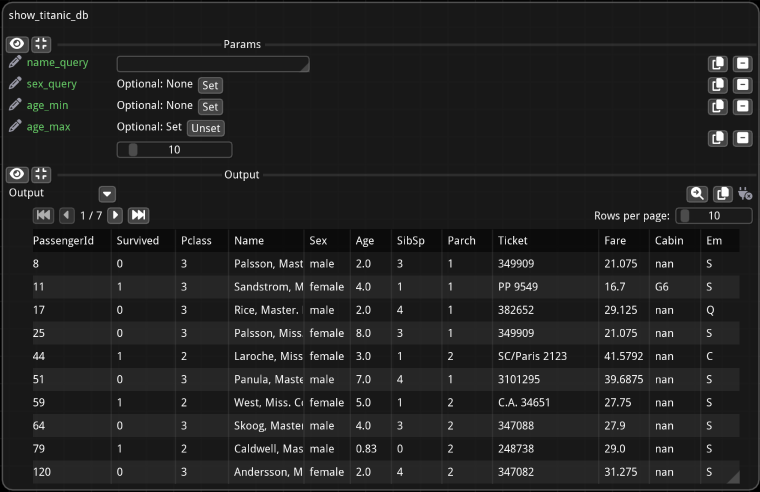
By clicking on the magnifier button  on top of the dataframe, you can open it in a popup where sorting options are available. Click on one column (or shift-click on multiple columns) to sort the data.
dataframe_with_gui_demo_titanic.main()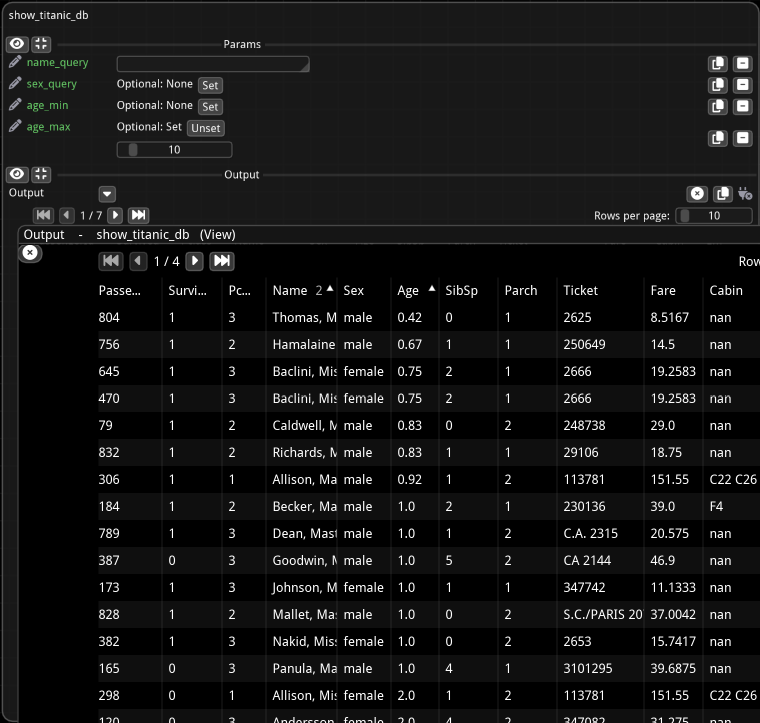
Fiat attributes available for DataFrameWithGui
Here is a list of all the possible customizations options:
%%bash
fiatlight gui DataFrameWithGui
GUI type: DataFrameWithGui
===========================
A class to present a pandas DataFrame in the GUI, with pagination and other features. Open in a pop-up for more features
Available custom attributes for DataFrameWithGui:
--------------------------------------------------------------------------------
+------------------------+---------------------+--------------+-----------------------------------------------+
| Name | Type | Default | Explanation |
+========================+=====================+==============+===============================================+
| widget_size_em | tuple[float, float] | (50.0, 15.0) | Widget size in em units |
+------------------------+---------------------+--------------+-----------------------------------------------+
| column_widths_em | dict | {} | Dictionary to specify custom widths for |
| | | | individual columns, identified by column name |
+------------------------+---------------------+--------------+-----------------------------------------------+
| rows_per_page_node | int | 10 | Number of rows to display per page (when |
| | | | displayed in a function node) |
+------------------------+---------------------+--------------+-----------------------------------------------+
| rows_per_page_classic | int | 20 | Number of rows to display per page (when |
| | | | displayed in a pop-up) |
+------------------------+---------------------+--------------+-----------------------------------------------+
| current_page_start_idx | int | 0 | Index of the first row on the current page, |
| | | | used for pagination |
+------------------------+---------------------+--------------+-----------------------------------------------+
Available custom attributes for AnyDataWithGui Generic attributes:
--------------------------------------------------------------------------------
+----------------+--------+---------------------+------------------------------------------------+
| Name | Type | Default | Explanation |
+================+========+=====================+================================================+
| | | | **Generic attributes** |
+----------------+--------+---------------------+------------------------------------------------+
| validate_value | object | None | Function to validate a parameter value (should |
| | | | return DataValidationResult.ok() .error() |
+----------------+--------+---------------------+------------------------------------------------+
| label | str | | A label for the parameter. If empty, the |
| | | | function parameter name is used |
+----------------+--------+---------------------+------------------------------------------------+
| tooltip | str | | An optional tooltip to be displayed |
+----------------+--------+---------------------+------------------------------------------------+
| label_color | ImVec4 | ImVec4(0.000000, | The color of the label (will use the default |
| | | 0.000000, 0.000000, | text color if not provided) |
| | | 1.000000) | |
+----------------+--------+---------------------+------------------------------------------------+
Code to test this GUI type:
----------------------------
```python
import typing
import fiatlight
@fiatlight.with_fiat_attributes(
dataframe_param__widget_size_em = (50.0, 15.0),
dataframe_param__column_widths_em = {},
dataframe_param__rows_per_page_node = 10,
dataframe_param__rows_per_page_classic = 20,
dataframe_param__current_page_start_idx = 0,
# Generic attributes
dataframe_param__validate_value = None,
dataframe_param__label = "",
dataframe_param__tooltip = "",
dataframe_param__label_color = ImVec4(0.000000, 0.000000, 0.000000, 1.000000))
def f(dataframe_param: pandas.core.frame.DataFrame) -> pandas.core.frame.DataFrame:
return dataframe_param
fiatlight.run(f)
```
Source code for the example
import fiatlight
from fiatlight.fiat_notebook import look_at_code  # noqa
%look_at_python_file fiat_kits/fiat_dataframe/dataframe_with_gui_demo_titanic.py
Loading...